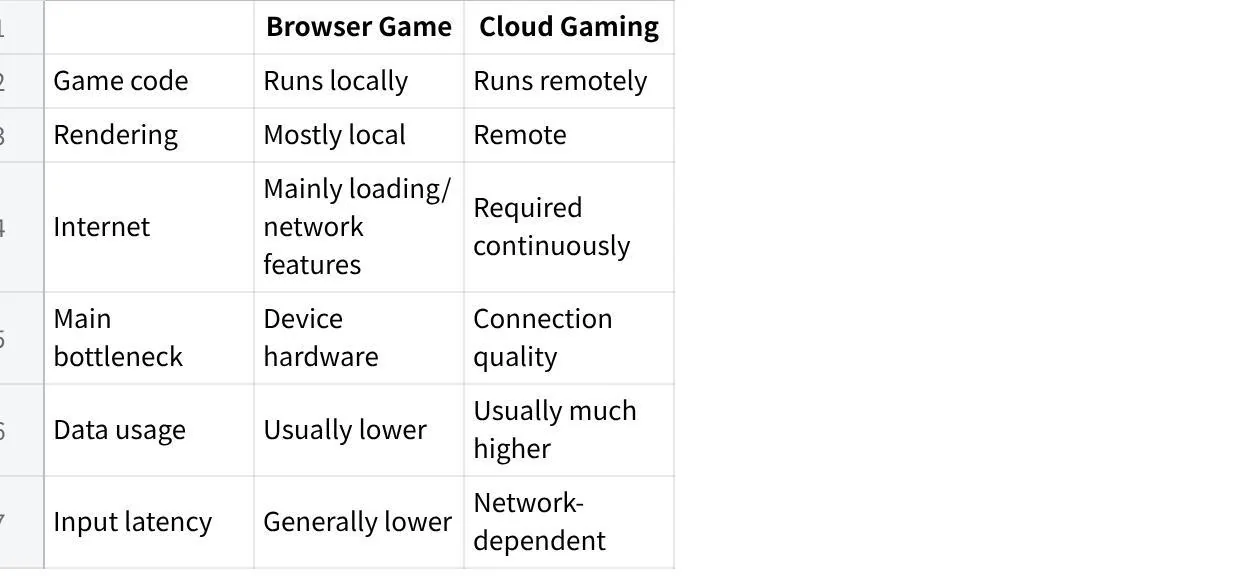
Browser Games vs Cloud Gaming: Where Code Runs
Playing a game inside a browser tab looks simple enough on the surface.
You click a link, wait a few seconds, and start playing.
Most people assume browser games and cloud gaming work the same way simply because they open in the same window.
They do not.
Standard browser games download the code and run it directly on your phone or computer. Cloud gaming processes everything on a remote server farm, streaming the action back to your screen like a live video feed.
What Really Happens When You Launch a Browser Game
Clicking a game link feels almost seamless: a quick loading bar pops up, and seconds later you are playing right inside the browser.
Behind that quick start, your browser is effectively acting as the game’s runtime environment. There are no setup wizards to click through, and your device generally renders the game locally. Some titles still contact servers for accounts, multiplayer, or saves.
Once those initial files load into memory, the tab becomes your whole game system. Closing the tab ends the current session; whether high scores and progress survive depends on how that game saves them.
Where Browser Games Keep the Code Running
The game runs locally, though it may still use online services.
Your device's CPU and GPU handle most of the game's computation and rendering, while the browser provides the runtime environment and access to web APIs. Your RAM holds the game state. The browser just provides the sandbox and the rendering surface. That is why a decent laptop can run surprisingly complex browser games without much trouble.
The core game code executes on your device after it has been downloaded, although the game may still communicate with remote servers for things like multiplayer, saves, authentication, or additional content. Updates happen only when you reload the page or the developer pushes a new version. Input feels direct because there is no round trip to a distant server for every keystroke or mouse move.
So which one should you actually use when you want zero setup?
This is the option that answers that question cleanly.
Cloud Gaming Turns Your Screen Into a Remote Display
Cloud gaming works differently.
You still open a browser or a thin client. But the heavy lifting happens on a remote server. The game runs on powerful hardware sitting in a data center. Your device only receives a compressed video stream and sends back your controller or keyboard inputs.
Think about it this way. Your screen becomes a window into an external server that might be composed of several machines. Because all the heavy processing runs off-site, you are basically playing inside a live video feed. That allows underpowered devices to run demanding titles smoothly. A basic Chromebook or smartphone can easily launch games that usually demand an expensive gaming rig. The real catch is that you are completely tied to your internet connection.

How Much Hardware Do You Actually Need
When comparing browser games vs cloud gaming, hardware demands sit at opposite ends.
Standard browser titles run on whatever machine you already have. Many lightweight HTML5 games run well on an everyday laptop with an up-to-date browser. More demanding WebGL titles may need stronger graphics hardware, so compatibility varies by game and device.
Cloud gaming completely flips those requirements. Because remote servers handle the heavy rendering, your local device can be surprisingly low-spec. Instead, the experience depends much more on your network connection and your device’s ability to decode the incoming video stream. Even an inexpensive tablet can deliver crisp visuals as long as your connection stays steady.
It comes down to where the heavy lifting happens. Traditional browser games rely on your local CPU, RAM, and graphics chip, while cloud services offload that work and put your network speed to the test instead.
Bandwidth and Latency Make or Break the Experience
Latency shows up differently in each case.
In browser games, the input path stays short. With local browser games, the input-to-rendering path stays on the device, avoiding the network round trip that cloud gaming introduces.
Cloud gaming adds a full network hop. Your input travels to the server, the frame gets rendered, encoded, sent back, and decoded on your end. That round trip adds latency, although how noticeable it feels depends on the connection and the game. Fast action makes delays easier to spot.
Bandwidth requirements climb with cloud options. For 1080p cloud gaming, around 25 Mbps is a common requirement, although the exact recommendation varies by service, resolution and frame rate. Locally running browser games download code and assets, and some continue using the network for multiplayer, saves, or additional content. Offline play is possible only when a particular game supports it; cached files alone do not guarantee it.
Honestly, it depends on how patient you are with occasional stutters.
Data Consumption Hits Differently Than You Think
Browser games often cache assets and may reuse them on later visits.
A browser game may download anything from a relatively small bundle to hundreds of megabytes or more, depending on its assets and architecture. Data use during play varies: a small offline-capable game uses less than one that keeps fetching assets or connecting to a server.
An hour of cloud gaming can consume roughly a few gigabytes of data, depending heavily on resolution, frame rate, bitrate, and the service's compression settings. Higher resolutions and frame rates push the numbers higher still.
That difference matters if you play on a metered connection or share bandwidth with other household devices. For many locally running browser games, gameplay uses less continuous data than a video stream, though downloads and online features still count.
HTML Games Offer a Different Kind of Freedom
Many browser games are built with standard web technologies.
They sit on a webpage, load through standard web technologies, and require nothing beyond a modern browser. Developers ship them quickly. Players jump in without accounts or downloads in a lot of cases.
You still see the same local execution model. The difference is mostly packaging and scope. Some HTML Games stay tiny and clever. Others stretch into full experiences that rival native titles from a few years ago.
This approach works well when you want something lightweight and shareable without installing a separate client.
Letting Your Hardware Make the Decision
When deciding between browser games vs cloud gaming, your physical setup usually makes the call before you even click play.
If you have an uncapped internet connection but a laptop that chokes on modern graphics, streaming opens up heavy titles your machine could never boot on its own. Run a free trial first just to test the camera movement. As long as the latency feels manageable, letting a remote server do the heavy lifting makes a lot of sense.
Many lightweight web games can run on modest hardware, but demanding browser titles are a different story. If you care more about snappy, instant controls than realistic lighting, running code locally is the smarter move. A better test is to play the actual game for a few minutes and check responsiveness, heat, and battery use.
If controls stay responsive and the device remains comfortable to use, it is probably a good fit.
Time is another huge factor. Clicking into a simple web interface works perfectly when you are stuck on a short commute. But if you want to sit down and play a heavy narrative title for the entire evening, streaming is going to feel a lot more comfortable, assuming your home router can handle the traffic.